The Market-Intelligence Seat Audit: How to Justify or Consolidate Your Talent Intelligence Spend
—— Read time: 7 min
The short answer
Most teams pay for market intelligence by the seat, but few know who uses those seats, or for what. Audit by use, not by tool. List the research your team actually does, who does it and how often, then sort each use into one of three groups: keep it where it is, move it into your recruiting platform, or stop paying for it.
Recruiter and TA research, such as talent maps, pool sizing, where to source and who's competing for talent, often fits inside a recruiting platform, where it connects straight to candidates and outreach. Long-range workforce planning, org design and data feeds into BI tools usually still need a dedicated tool. Sorting the uses this way gives finance a case it can approve: fewer seats, the same answers, and research tied to hiring.
Why audit now
Budgets are being defended line by line. Finance teams ask every function to justify each tool, and a seat nobody can explain is the first one cut.
The research and the search live in different tools. A recruiter finds the market answer in one product, then rebuilds the search in another, so the same work is paid for twice.
Usage drifts. Seats bought for one project or one team stay on the invoice long after the need has changed.
Renewals arrive before reviews do. Without an audit, most renewals are decided by habit, not by use.
An audit doesn't have to end in cuts. Sometimes it shows a tool deserves more seats. The point is to know.
Step 1: List the uses, not the tools
Start with what your team actually does with market intelligence. A typical list looks like this:
Use
Who typically needs it
Where it usually fits
Talent maps for hard or senior roles
Recruiters, sourcers and TA leaders
Recruiting platform
Sizing the pool before an intake meeting
Recruiters and TA leaders
Recruiting platform
Where to source: feeder companies, adjacent titles, schools
Recruiters and sourcers
Recruiting platform
Competitor hiring and talent flows
TA leaders and recruiters
Recruiting platform
Pay ranges for a specific role and market
Recruiters, TA leaders and compensation
Either
Comparing cities for a new team
TA leaders, finance and real estate
Either
Briefings for leadership
TA leaders
Either
Long-range supply and demand projections
Workforce planning and people analytics
Dedicated tool
Headcount scenarios and org design
Workforce planning and finance
Dedicated tool
Data feeds into BI tools
People analytics
Dedicated tool
Add any use that's specific to your team. The list of uses, not the vendor, is what you're auditing.
Step 2: Find out who uses the seats
For each seat, collect four facts:
Who holds it, and which team they're on.
How often they used it in the last 90 days, from your vendor's usage report or admin console.
What they used it for, mapped to the uses in Step 1.
What they'd lose if the seat went away. Ask them directly; the answer is often narrower than the license.
Seats with no recent use are easy calls. Seats used for one or two research tasks are where the real decisions are.
Step 3: Sort every use into keep, move or stop
Decision
When it fits
What to check first
Keep it where it is
The use needs capabilities your recruiting platform doesn't have, such as long-range projections or BI data feeds, or the seat holder works outside recruiting
That the seat is actually used, and by whom
Move it into your recruiting platform
The use is recruiter or TA research that leads to a search, such as talent maps, pool sizing, where to source and competitor hiring
That the platform answers the exact role, shows its sources and connects to candidates, using a side-by-side test (Step 5)
Stop paying for it
No meaningful use in the last 90 days, or the same answer is already available elsewhere
That nobody depends on it for a recurring report
Most audits end with a mix: some seats kept for planning teams, research moved for recruiters and a few seats retired.
Step 4: Build the business case
Finance approves numbers it can check. Fill in this worksheet with your own figures:
Line
What to enter
Seats today
The number of market-intelligence seats you pay for, and the annual cost per seat
Seats with no recent use
Seats with no meaningful use in the last 90 days
Seats whose uses can move
Seats used only for research your recruiting platform can cover
Seats to keep
Seats used for planning, analytics or BI needs
Spend freed
Retired and moved seats, multiplied by the cost per seat
Added cost, if any
Anything extra your recruiting platform charges to cover the moved uses
Net change
Spend freed minus added cost
What the team gains
Research that connects straight to candidates and outreach, and one fewer tool to learn
Then add the risks and how you'll handle them: what happens to saved reports, who trains the team and when you'll check that nothing important was lost. A one-page version of this table, with your own numbers, is usually enough for a renewal decision.
Step 5: Run a side-by-side before renewal
Before you move any use, test it with real work:
Pick a recent report your team actually used, such as a talent map or a pool estimate for a live role.
Ask the same question in the platform you're considering.
Compare the answers on five points: whether each answers the exact role or only the nearest job category, whether you can see the source and date behind every number, how long it took and how much training it needed, whether it leads to real candidates you can contact, and whether a hiring team could understand it without a walkthrough.
Decide with the team that uses it, not only with the person who signs the contract.
If the new answer is as good or better for that use, move it. If not, keep the seat. Either way, you'll renew on evidence.
What to keep in a dedicated tool
Consolidation isn't always the answer. Keep a dedicated market-intelligence tool for the people who rely on it for:
Long-range supply and demand projections, five or ten years out, for workforce planning.
Headcount scenarios and org design that finance and HR model together.
Data feeds into BI tools or a data warehouse, where people analytics builds its own dashboards.
Geography below the metro level, such as ZIP-code or county views for site selection.
Keeping those seats for planning teams while moving recruiter research into the recruiting platform is often the right result: a smaller, better-justified tool budget, not a forced choice.
See it in action: what EZ Insights covers for recruiting teams
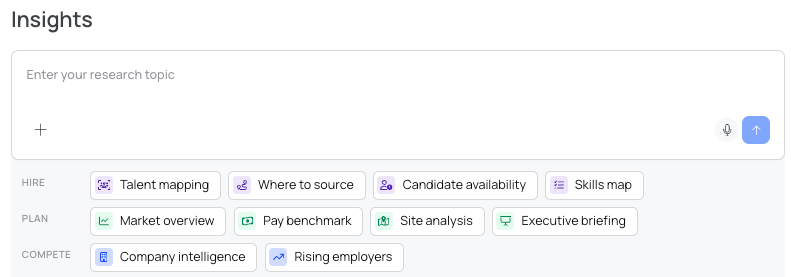
EZ Insights is built for the recruiter and TA research in Step 1, and its research menu is organized the way that research gets used:
Hire: talent mapping, where to source, candidate availability and skills maps.
Plan: market overviews, pay benchmarks, site analysis and executive briefings.
Compete: company intelligence and rising employers.
Because Insights lives inside hireEZ, each answer connects to the work that follows it: real example profiles behind the numbers, a source and date on every figure, view-only links to share, and EZ Agent to turn the research into a search. For worked examples, see Your Talent Competitors Aren't Your Business Competitors and Market Size vs. Reachable Pool, and for the full platform, see What Is hireEZ?.
Run the side-by-side with us. Send a recent market report your team relied on, and we'll run the same question in EZ Insights so you can compare the two on the five points above. Book a side-by-side
Frequently asked questions
What is a talent intelligence seat audit?
A review of every market-intelligence seat your team pays for: who uses it, for what and how often, so each use can be kept, moved into your recruiting platform or stopped.
How do you justify talent intelligence spend to finance?
Show the uses behind each seat, retire the ones nobody uses and present a one-page worksheet with seats today, seats after, spend freed and what the team gains.
Do recruiters need a separate labor market data tool?
Often not for day-to-day research such as talent maps, pool sizing and where to source, which some recruiting platforms now cover. Workforce planning teams that need long-range projections or BI data feeds usually still do.
What can move from a market-intelligence tool into a recruiting platform?
Research that leads to a search: talent maps, pool sizing before an intake meeting, where to source, competitor hiring and briefings for hiring teams.
When should you keep a dedicated workforce planning tool?
When your team relies on long-range supply and demand projections, headcount scenarios, BI data feeds or geography below the metro level.